Organize a wedding guest list by keeping each person’s invitation, RSVP, meal note, and next follow-up in one consistent record. Start with households and guest groups, then update the same list as invitations go out and replies arrive. The format below is a planning aid, not a seating chart or a wedding-planning timeline.
Set up the guest list before sending invitations
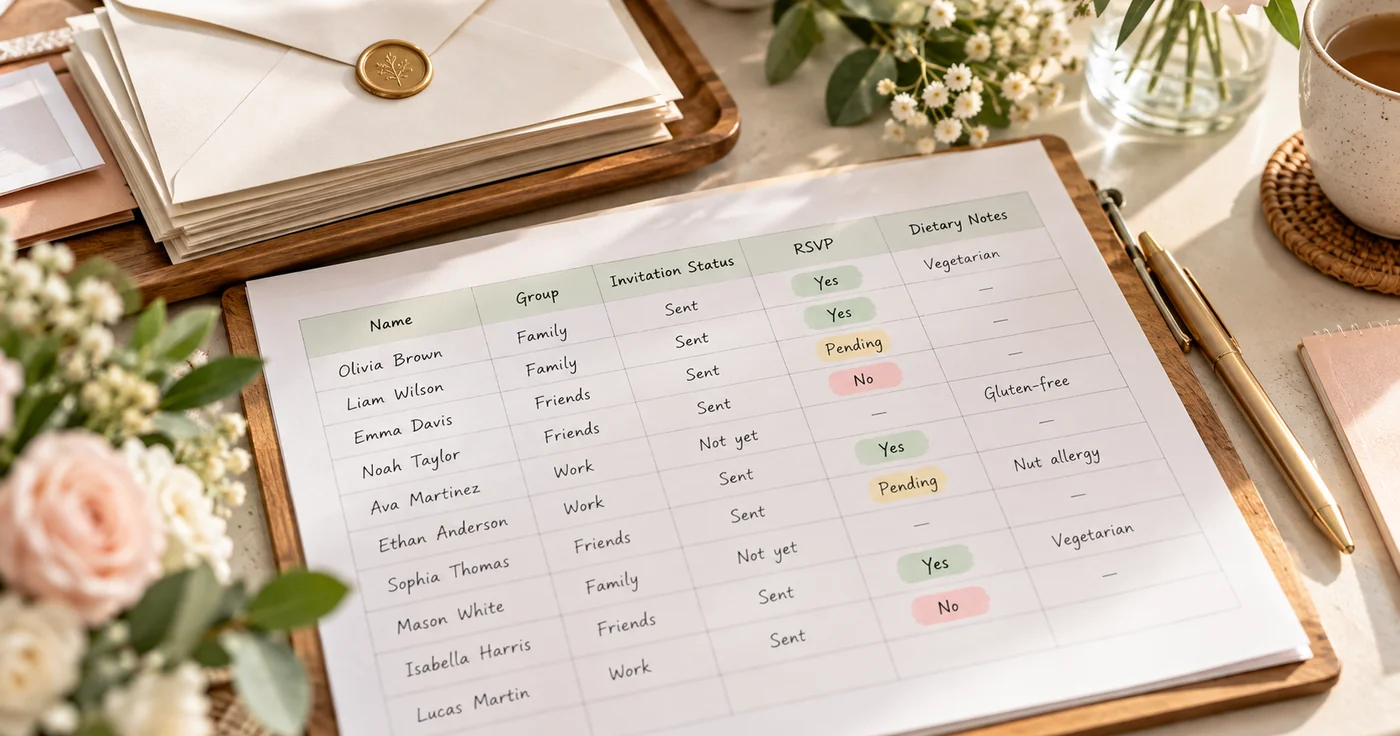
Start with a working list, not a final promise. Group people in a way that helps you review the list—such as by household, relationship group, or whose invitation list they came from. Agree on your own rules for plus-ones and children before tracking individual replies.
Use a consistent identifier for each person, even when an invitation goes to a household. That makes it easier to see who has replied and who still needs a follow-up.
Copyable guest record
GUEST ID:
FULL NAME:
HOUSEHOLD / INVITATION GROUP:
RELATIONSHIP GROUP:
INVITATION STATUS: Draft / Approved / Sent / Not invited
INVITATION SENT DATE:
RSVP STATUS: Awaiting / Accepted / Declined / Partial / Follow-up needed
REPLY DATE:
PLUS-ONE: Not offered / Offered / Name pending / Name confirmed / N/A
CHILDREN: Not invited / Invited / Number confirmed / N/A
MEAL OR DIETARY NOTE NEEDED:
FOLLOW-UP ACTION:
FOLLOW-UP OWNER:
FOLLOW-UP DATE:
FINAL ATTENDANCE: Yes / No / Pending
“Partial” is useful when one person in a household replies but another has not. Keep RSVP status separate from invitation status: a sent invitation is not the same as a confirmed reply.
Organize the list in four passes
1. Group the first draft
Make a separate group for each household or invitation source, then list each person on their own line. If you are balancing input from different parts of the family, add a neutral source label such as “Partner A,” “Partner B,” or “Joint.” The label helps organize discussion; it does not have to appear on an invitation.
2. Record invitation decisions
Choose the invitation status from the same set of values each time. Before sending, check the household, names, plus-one rule, and whether children are included. If a decision is not final, label it “Draft” instead of treating it as settled.
3. Update each reply as it arrives
Record the reply date and the response for each person covered by the invitation. For a household response, update each guest separately so a partial reply does not look complete. If a reply is unclear, use “Follow-up needed” and write the exact question to ask.
4. Turn unanswered replies into follow-ups
Use a small follow-up queue rather than scanning every row repeatedly:
| Guest or household | What is missing? | Follow-up owner | Follow-up date | Result |
|---|---|---|---|---|
| ____________________ | RSVP / plus-one / meal note | ____________________ | ____________________ | Pending |
| ____________________ | RSVP / plus-one / meal note | ____________________ | ____________________ | Pending |
After the follow-up, update the guest record and remove the item from the queue. Keep the status wording consistent so pending replies are easy to spot.
Track meal information without mixing it into RSVP status
First record whether a meal or dietary note is needed. Then write the practical information that the caterer needs to prepare the agreed meal, using the wording provided by the guest. Keep that note separate from the RSVP answer so accepting an invitation does not imply that meal details are complete.
RSVP: Accepted
MEAL SELECTION: ____________________
DIETARY NOTE PROVIDED: ____________________
NEEDS CONFIRMATION: Yes / No
If you do not yet know the meal choices or what information the caterer needs, leave the field pending rather than guessing. Do not turn a guest’s note into a diagnosis or make assumptions about what they can eat.
Use a simple status summary
Once replies begin, a summary makes the next task visible without replacing the detailed records:
| Group | Invitations sent | Accepted | Declined | Awaiting reply | Meal notes to confirm |
|---|---|---|---|---|---|
| Household / group A | ___ | ___ | ___ | ___ | ___ |
| Household / group B | ___ | ___ | ___ | ___ | ___ |
| Household / group C | ___ | ___ | ___ | ___ | ___ |
Update the counts from the individual guest rows. If a household has several invitees, do not count its response as complete until each person’s attendance is clear.
Keep the guest record separate from the wedding timeline
The guest list answers “who is invited, who has replied, and what still needs follow-up?” A wedding checklist answers “what planning task happens next?” Keep each record focused, and link them only where a deadline needs to be visible. The Wedding Planning Checklist covers the broader sequence of planning tasks; How to Make a Checklist explains how to structure a repeatable list.
Conclusion
Keep one consistent record per guest, distinguish invitations from replies, and give each unanswered question an owner and follow-up date. Start by copying the guest-record fields and testing them on one household before moving the whole list into your chosen planning format.